Convert Your U.S. Salary to an Hourly Rate: Adjust for PTO and Taxes
Turn a U.S. salary into an hourly rate using the 2,080 hour formula. Then adjust for PTO, pay cadence, and taxes. Calculators and source links included.
By the Salary Atlas editorial team · Published

Divide your annual salary by 2,080, the standard number of full-time work hours in a year (40 hours a week times 52 weeks), and you get your gross hourly rate. A $60,000 salary works out to about $28.85 an hour. That figure ignores unpaid time off, taxes, and benefits, so treat it as a starting point, not your actual take-home pay.
TL;DR:
- The standard 2,080-hour baseline assumes no unpaid time off, so real hourly rates are often higher after adjusting for PTO, holidays, and unpaid leave.
- Converting different pay frequencies requires multiplying by 12, 26, or 24 periods before dividing by 2,080, with biweekly payments being the most common source of errors.
- Your actual take-home pay is lower than gross calculations due to taxes and deductions, typically reducing the hourly rate to around 20-25% less depending on your tax situation.
- For accurate comparisons, always calculate both gross and net hourly rates using your actual PTO and tax considerations to gauge true job value.
- Recognize that overtime, benefits, and schedule flexibility significantly influence a job’s real worth beyond the simple hourly conversion.
Table of Contents
- What Is the Salary-to-Hourly Conversion Formula?
- How Do You Convert Monthly, Biweekly, or Semi-Monthly Pay to Hourly?
- Should You Adjust for PTO, Part-Time Hours, or Unpaid Leave?
- Why Your Real Hourly Rate Is Lower Than the Math Says
- Common Salaries Converted to Hourly Pay
- Using Your Hourly Number to Compare Offers or Set Rates
- Why You Can Trust These Numbers
- Where to Verify These Numbers Yourself
- The Real Value of a Salary-to-Hourly Conversion
- Sources
- FAQ
What Is the Salary-to-Hourly Conversion Formula?
The math behind salary to hourly conversion is one division problem: Hourly = Annual Salary ÷ (Hours per Week × Weeks per Year). Most calculators default to 40 hours a week and 52 weeks a year, giving you the familiar 2,080-hour baseline that the U.S. Department of Labor uses as the standard full-time reference point.
Here's why 2,080 shows up everywhere: 40 hours × 52 weeks = 2,080. It assumes you work every single week of the year with no vacation, no sick days, no holidays off. That's rarely how real jobs work, but it's the number payroll systems and most online tools use by default because it's simple and consistent across employers.
Running the calculation yourself takes about ten seconds:
- Take your annual salary. Let's say $60,000.
- Divide by 2,080.
- $60,000 ÷ 2,080 = $28.85 per hour, before taxes.
How Do You Convert Monthly, Biweekly, or Semi-Monthly Pay to Hourly?
Not every paycheck comes annually, so the conversion changes depending on your pay cadence. The trick is converting whatever frequency you're paid at into an annual figure first, then applying the same hourly formula.
- Monthly to hourly: Multiply your monthly pay by 12 to get an annual figure, then divide by 2,080. A $5,000 monthly salary becomes $60,000 a year, or $28.85 an hour.
- Weekly to hourly: Multiply your weekly pay by 52, then divide by 2,080 (or just divide your weekly pay by your weekly hours directly).
- Biweekly to hourly: Biweekly means 26 pay periods a year, since you're paid every two weeks. Multiply your biweekly check by 26, then divide by 2,080.
- Semi-monthly to hourly: Semi-monthly means 24 pay periods, paid twice a month regardless of how many weeks that spans. Multiply by 24 instead of 26.
Should You Adjust for PTO, Part-Time Hours, or Unpaid Leave?
The 2,080-hour baseline assumes you're clocked in every week of the year, which almost nobody actually is. An adjusted calculation, one that subtracts vacation, holidays, or unpaid leave from your total hours, gives you a more honest effective hourly rate, especially when you're comparing two job offers with different PTO policies.
Here's how to build the adjusted version:
- Start with your total annual salary.
- Subtract your unpaid or PTO weeks from 52. Two weeks of vacation brings you to 50 working weeks.
- Multiply 50 weeks by 40 hours to get 2,000 annual hours instead of 2,080.
- Divide salary by that adjusted hour count.
Part-time and compressed schedules need the same treatment. A 37.5-hour workweek across 50 paid weeks is 1,875 annual hours, not 2,080, and that gap alone shifts your hourly equivalent by several percentage points.
Pro Tip: When you're comparing two job offers, always calculate both using the adjusted method. A lower salary with five weeks of PTO can beat a higher salary with two, once you look at the real hourly rate for hours you'll actually work.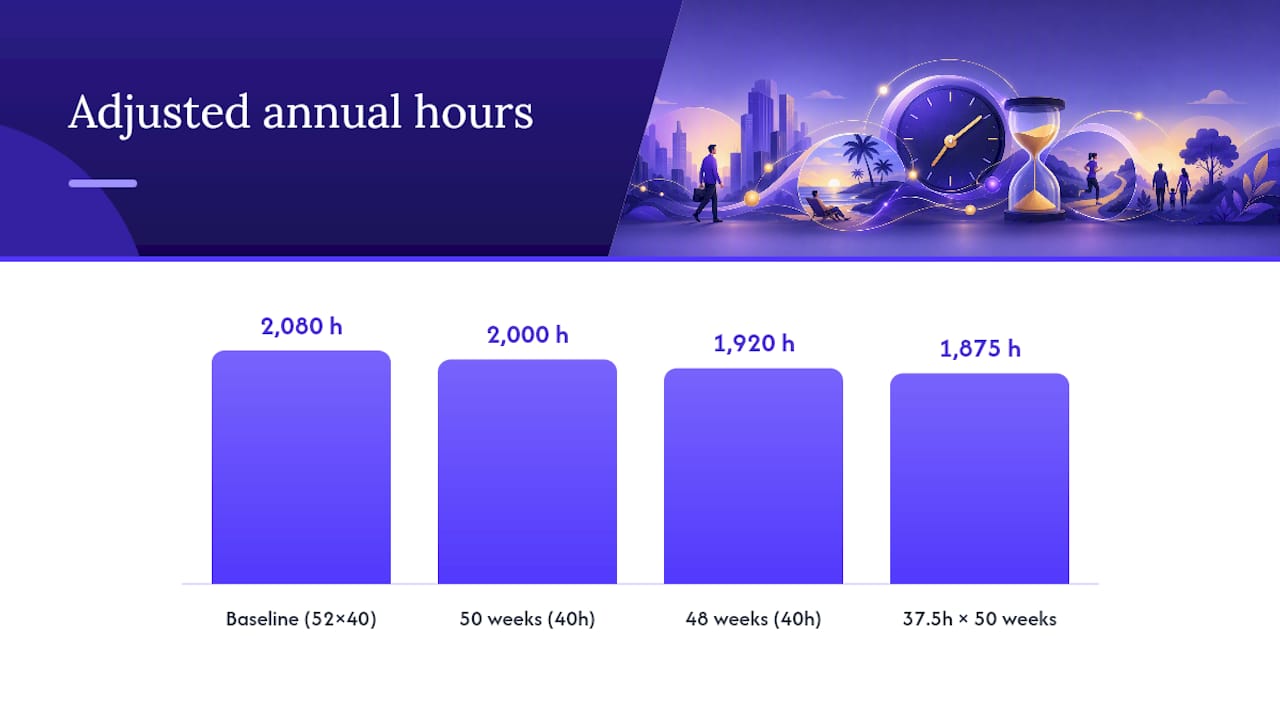
Why Your Real Hourly Rate Is Lower Than the Math Says
Every conversion so far gives you gross pay, the number before anyone takes a cut. Your actual paycheck looks smaller once federal income tax, Social Security, and Medicare come out, along with any state income tax where you live. Paychex's breakdown of gross versus net pay lays out the full list of what typically gets withheld:
- Federal income tax, based on your bracket and filing status
- Social Security and Medicare (FICA), a fixed percentage regardless of income level
- State income tax, where applicable
- Pre-tax deductions like 401(k) contributions and health insurance premiums
If you want a precise net figure, run your numbers through an after-tax hourly calculator rather than relying on gross conversions alone. Gross-to-net is the step most salary calculators skip entirely, and it's the reason two job offers with identical gross pay can leave very different amounts in your bank account.
Common Salaries Converted to Hourly Pay
Here's a quick reference using the standard 2,080-hour baseline, all figures shown as gross hourly pay before taxes:
Apply the PTO adjustment and the numbers shift. Take that same $70,000 salary, subtract two weeks of vacation to get 50 working weeks (2,000 hours), and the effective hourly rate climbs to $35.00, about a dollar more than the unadjusted figure. That gap widens further for salaries with more generous time-off packages, which is exactly why the adjusted method matters more as PTO increases.

Using Your Hourly Number to Compare Offers or Set Rates
A converted hourly rate only tells part of the story. Total compensation includes benefits, PTO, overtime eligibility, and schedule flexibility, all of which change what a job is actually worth to you.
Before accepting an offer or setting a freelance rate based on a hourly wage calculator, ask the employer three direct questions:
- What counts as standard hours, and is overtime expected or compensated?
- How many paid vacation, sick, and holiday days come with this role?
- Is this position exempt or non-exempt under overtime rules?
Freelancers setting rates should push the number higher still, since billable hours never match total working hours once you account for admin, marketing, and slow weeks.
Why You Can Trust These Numbers
Salary Atlas builds every wage figure on this site from Bureau of Labor Statistics OEWS data, and every number links back to its original government source so you can verify it yourself.
- Data refreshes annually to reflect current BLS releases, not stale averages
- No paywalls, signups, or gated figures behind a subscription
- Full sourcing details live on the Salary Atlas methodology page
- Occupation-specific hourly data, like the figures in our nurse hourly pay breakdown, follows the same sourcing standard
Where to Verify These Numbers Yourself
For deeper reading, the Department of Labor's FLSA fact sheet covers overtime and hours rules directly, while Paychex's gross-to-net primer explains deductions in full.
The Real Value of a Salary-to-Hourly Conversion
Most salary calculators stop at the formula and call it done. That's the gap worth naming: a bare hourly number without context is barely more useful than the salary figure you started with, because it hides the two things that actually determine whether a job is worth taking, how many hours you'll really work and how much of that paycheck survives taxes.
The adjusted-hours method deserves more attention than it gets. Conventional advice treats 2,080 hours as gospel, but almost nobody works a true 52-week year without a single day off. If you're comparing offers, run both through the adjusted formula, subtracting real PTO, before you trust either number.
My priority for readers: don't stop at gross hourly. Pair the conversion with a net-pay estimate and an honest look at overtime eligibility. A high hourly rate on a role with no overtime and thin benefits can lose to a lower rate with real paid time off. The formula is the easy part. Reading what it actually tells you about a job is where the real decision gets made.
, Joelen Zyoktova
Sources
FAQ
How Do You Convert a Salary Into an Hourly Rate?
Divide the annual salary by the total number of hours worked in a year, typically 2,080 for a standard 40 hour, 52 week schedule. Divide the annual salary by 2,080, the standard number of work hours, to get the gross hourly rate before taxes.
What Is $70,000 a Year Per Hour?
A $70,000 annual salary equals about $33.65 an hour using the standard 2,080-hour baseline. Adjust for two weeks of unpaid time off and the effective rate rises to $35.00 an hour.
How Much Is $40,000 a Year Hourly?
A $40,000 salary works out to roughly $19.23 an hour based on 2,080 annual hours. That figure reflects gross pay before federal, state, and FICA withholdings.
How Much an Hour Is $60,000 a Year?
A $60,000 salary converts to about $28.85 an hour gross, using the standard 40 hour, 52 week formula. Adjusting for PTO or a shorter work year would raise that effective hourly rate slightly.
Recommended
Occupation wage figures on Salary Atlas come from the U.S. Bureau of Labor Statistics. Figures in this article that are not linked to a source are estimates. See our methodology.